
The contact & Basic Info Page is were users add their contact information such as their phone numbers, basic information such as their birthdate.
To fill the information of the "contact & Basic Info" page:
1. click on "About" in the side menu of your profile.
2. Click on "contact & Basic Info" from the list that shows.
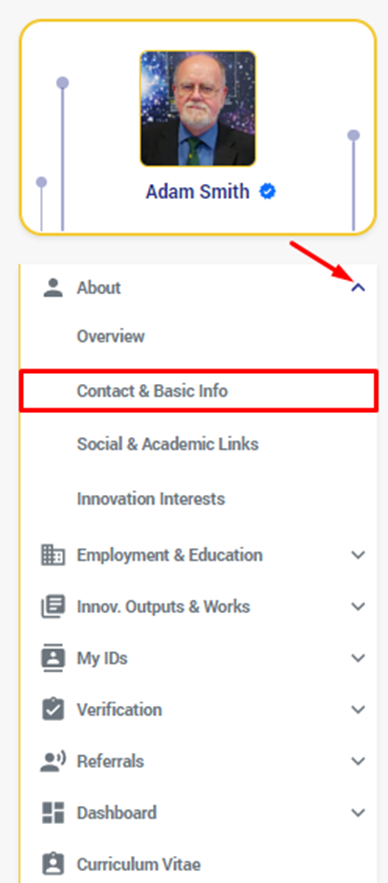
3. you will be redirected to the "Contact & Basic Info." page.
It has two separate sections for each; the contact info has a section and the basic info has another section.
- Now you can add your details by clicking on "+ " beside each field and edit them by clicking on "
".
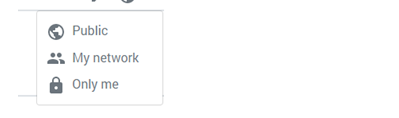
- You can control who can see each piece of information you add to the system by clicking on beside each field and choosing between these options:
Let's start filling the "contact info" fields by adding your Email addresses:
4. Add your Email Addresses by Clicking on the "+" button on the top right corner next to the section titled "Email Addresses".
5. Enter an email address in the field of the pop up window that expands and click on "Save". as you can enter as many emails as you desire and they will be listed from the most recently entered to the latest within the email addresses section.
6. Add your phone numbers using the same method you used for adding an email mentioned above in the field titled "Phone Numbers" and you can add as many as you want as well.
7. Add your Address details and click on the "Save" button. 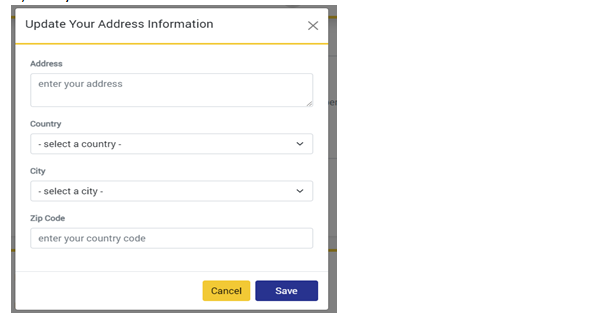
8. Click on the "Edit " Button next to the "Basic Info" section.
9. Add your "Birthdate", "Gender", and "Nationality" in the "basic info" pop up that opens when the Edit button is clicked, and Click on the "Save" Button.
Comments
0 comments
Please sign in to leave a comment.