
To fill the information of the "Innovation Interests" page:
1. Click on " Innovation Interests " from the list that lies under the "About" menu:
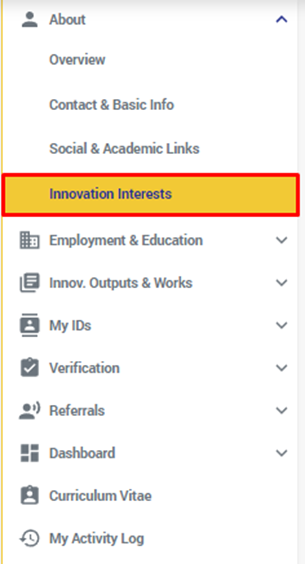
2. You will be redirected to the "Innovation Interests" page.
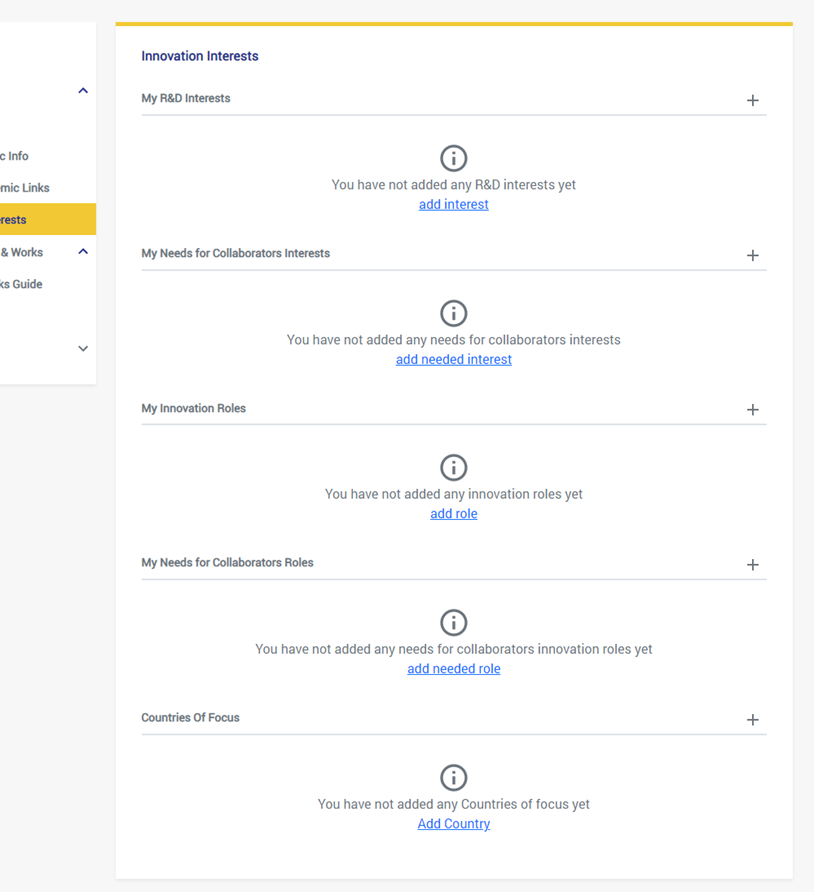
3. you can start adding your Interests by adding your "R&D Interests", Keeping in mind that you can add as many ISAs as you desire and set each ISA added to a Suitable Privacy setting (This applies on all ISA types).
- By adding these interests you're telling what your interests in innovation are; this will help you find people who have similar interests as you, and help others find you.
- the "+" button on the right of the title or on "Add an interest" from the link button contained in the section.
- the "Add an R&D Interest" pop up will expand
- Select the domain of the interest and its area from the drop-down lists.
- Select this interest from the "innovation subject area (ISA)" dropdown list.
- Click on "Save"
- You can add as many as you want by clicking on "+" on the right of the title.
4. keep adding your interests in order by clicking on the Add "+" button, or the link button labeled "Add Needed Interests" on the "My Needs for Collaborators Interests" section, this will help you find collaborators to your works who have the interests you specified.
5. Add your "Innovation Roles" by clicking the "Add +" button or linkable button in the section, Select and "Innovation Role" from the drop down list labeled "Select an Innovation Role", and Click on the "Save" button.
6. Add your needs of collaborators roles, These are the roles that you need people who can fulfill them to collaborate in your work.
**In the same manner as the above step.
7. Add Your "Countries of Focus".
Comments
0 comments
Please sign in to leave a comment.