
The Employment information page shows information about the organizations you've had employment affiliations with, examples of employment affiliations include:
- Faculty or staff
- Postgraduate researcher
- Intern
- Society employee
- Contractor
JOIP users can add as many Employment Affiliations as they need and set them to their suitable privacy settings based on who they want to allow to view them.
To "Add" an employment affiliation:
1. While on your profile page, click on "Employments & Education".
2. From the Drop Down List that expands, Click on "Employments"
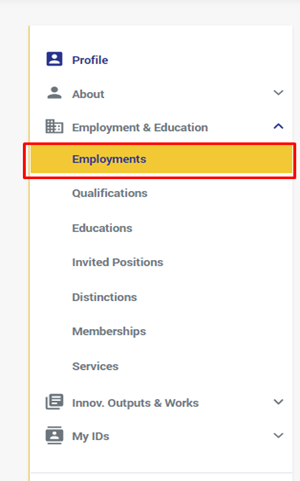
3. You will be redirected to the "Employments" page to add your employment affiliations by:
- Click on the Add "+" button at the top right corner of the page's body in the lists header.
- If no employments are added to ORCID and fetched to the list by JOIP, Click on the linkable button labeled "Add Employment" in the body of the empty list.
4. a pop up window titled "Add Employment" will be opened for you where you have to fill at least the mandatory fields to add the employment affiliation to the list (Mandatory Fields "ORG. Name, Country, and City fields" are shown in the Figure Below) and then click on the "Save" button.
5. The Fields shown in the pop up to be filled are:
- Organization Name: the name of the organization you were/are employed at.
- Title: the title of the role/position you hold/held at this organization such as: intern, professor…etc.
- Department: the department in the org you used to have an employment affiliation with or still employed at.
- URL: A website URL related to your employment with the organization.
- Country: The country or territory of the organization. This is a required field.
- City: City where the organization is located. This is a required field.
- Start Date: The start date of your relationship with the organization. For example, the date that you started a degree program. It is strongly encouraged, but not required, to add a start date.
- End Date: The end date of your relationship with the organization, i.e. the date that your employment there ended. If you are still employed by the organization, you do not need to provide an end date.
- Profession: the Job title you used to do or still doing in the specified organization.
JOIP also provides it's users with the ability to edit previously added affiliations as all of the fields can be edited if the user have not verified the employment item added yet.
To "Edit" an employment affiliation:
1. Go to the employment item you want to edit, and click on the edit Button.
2. the "Update Employment" pop up window will open
3. Make the Changes you desire on all fields keeping in mind that if the employment item your updating is "Verified", Some fields will appear dimmed (such as the ORG. Name field), and then click on the "Save" button.
4. the employment item you updated will be saved and updated in the list Successfully.
To "Delete Employment" affiliations added:
1. Go to the employment affiliation item you want to delete from the list, and click on the delete button
2. after Clicking the "Delete" button, a confirmation pop up message will be shown to the user titled "Delete Employment" asking you to confirm the deleting action.
3. Click on the "Confirm" Button to successfully delete the affiliation from the list.
Comments
0 comments
Please sign in to leave a comment.